Stop playing telephone between your users and your AI
Your users press Record and show you what broke, like sharing their screen on a call. The video, their words and every error land in one report that Claude Code, Cursor or Codex can read. You just pick what to fix.
Share this tab?
norde.store wants to record this tab
 CancelShare
01Press Record, pick the tab
The same prompt you see before sharing your screen in a meeting.
02Show what went wrong
They use your app as usual, press Stop, and add a sentence about it.
Claude Code
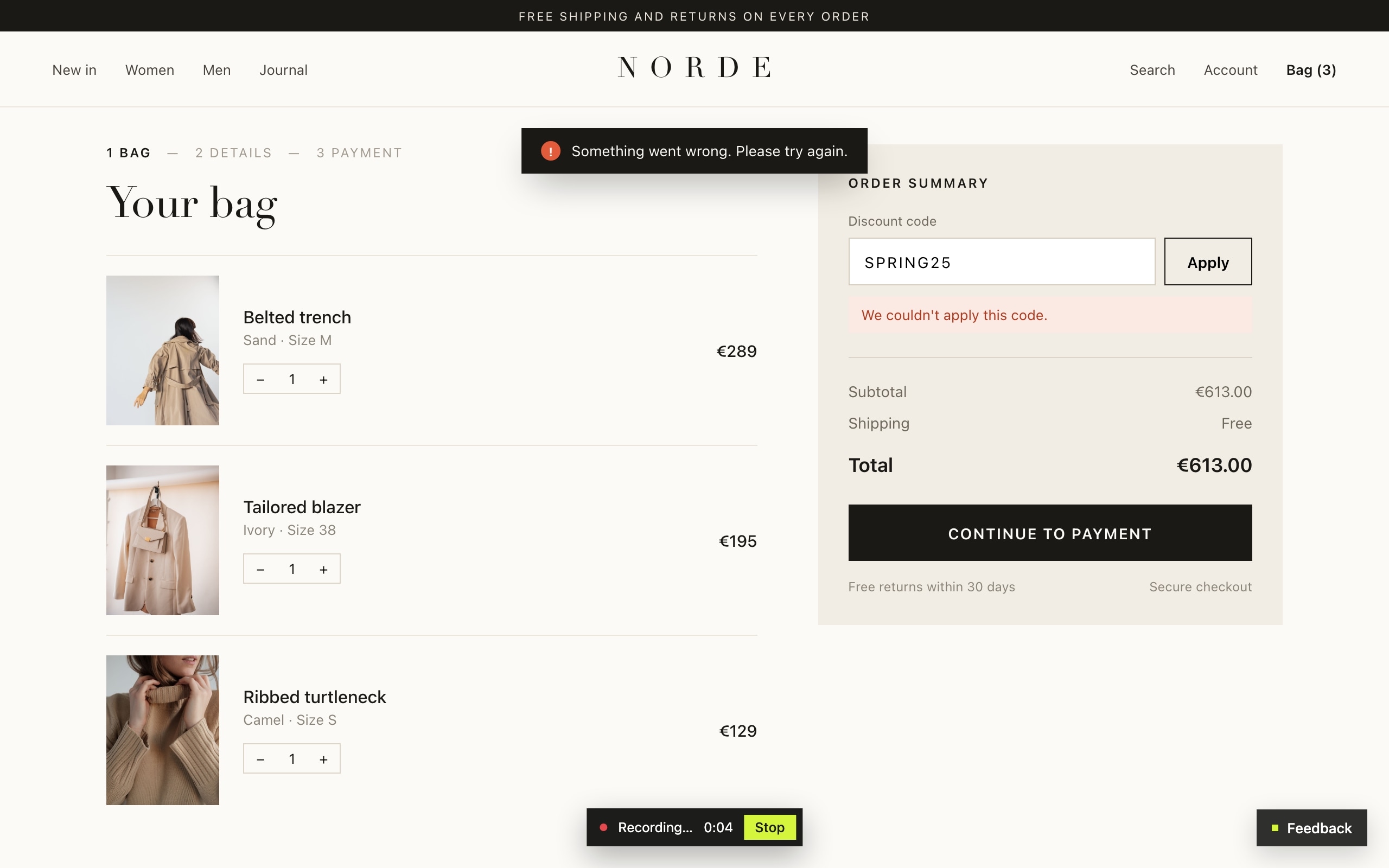
Can you fix the coupon bug from the feedback inbox?
Read reportApplying the code SPRING25…The recording shows the coupon request returning 422 right after Apply, and the checkout code doesn't handle it. Should I fix it?03Hand it to your AI
Your coding agent reads the report and asks before it changes anything.
Right now, you're the middleman
A user says something's broken. You pass it on to your AI. Your AI asks questions you can't answer, because you weren't there either. With Uups, the report already has the answers.
Today
Your user
You, to Claude
Claude
…no idea. Time to email the user and wait.
With Uups
Applying the SPRING25 coupon says “Something went wrong”
Expected the 25% discount on the total.
- Page
- /checkout
- Browser
- Chrome on macOS
- Recording
- 0:07, with every click
- Errors
- POST /api/coupon → 422
TypeError: reading 'amount'
Claude: The coupon request returns 422 and the code doesn't handle it. Want me to fix it?
Live demo
Don't take our word for it. Break something.
This is the real widget, running on this page. Report the bug below and see exactly what would land in your inbox.
- 1Press Apply. The coupon is broken on purpose.
- 2Open the form, press Record and show the bug again.
- 3Send it and see what your coding agent would get.

Your bag (3)

Belted trench
Sand · M
$289

Tailored blazer
Ivory · 38
$195

Ribbed turtleneck
Camel · S
$129
- Subtotal
- $613
- Shipping
- Free
- Total
- $613
This demo runs entirely in your browser. Nothing is uploaded or saved.
Your report will show up here.
Screen recording works in desktop Chrome, Edge and Firefox.
Everything your AI needs to fix it
The report carries the evidence, so neither you nor your AI has to go looking for it.
NORDE
 Belted trench$289
Something went wrong.
1The coupon failsIt asks when something breaks
When a JavaScript error happens, the widget offers to report it right there. Users don't have to go find a contact form while they're annoyed.
1The user wrote one sentence
“The discount code doesn't work.”
2The widget attached the evidence
- 422POST /api/couponfailed request
- JSTypeError: reading 'amount'error
at apply (checkout.tsx:64)
- warnCoupon response missing discountconsole
Errors, stack traces and console, attached
The user writes one sentence. The widget adds every JavaScript error with its stack trace, every failed request and the console errors from the page.
Inbox
Discount code doesn't work
just now
Coupon not applying at checkout
Tue
Dark mode date picker
Tue
AI triage
- Summary
- The coupon request returns 422 and the checkout code reads a missing field.
- Priority
- urgent
- Severity
- major
- Duplicate of
- “Coupon not applying at checkout”
Triaged before you open it
On Pro and Max, AI reads each new report, writes a short summary, suggests priority and severity, and flags duplicates. One click to accept.
NORDE
Something went wrong.
Recording 0:04StopNORDE

Something went wrong.
1Chrome, Edge, Firefox: video
2Safari & phones: screenshot
Works in every browser
Chrome, Edge and Firefox can record the screen. In Safari and on phones, users take a screenshot and mark the problem on it.
Works where you build
Copy one prompt into your AI coding tool and it adds the widget in the right place for your framework. Or connect it over MCP and just say “install the feedback widget”.
- Lovable
- Bolt
- v0
- Replit
- Cursor
- Claude Code
- Codex
- Webflow
- Framer
- Plain HTML
Claude Code
Add the Uups feedback widget to this app so users can report bugs with a screen recording. <script src=…>
On your site in a few minutes
No package to install and nothing to configure. If you build with AI, it can add it for you.
<script src=".../widget.js" data-project-key="pk_..." async></script>Copyor
01
Add one line to your site
Copy it from your project and paste it in, or ask your AI coding tool to do it.
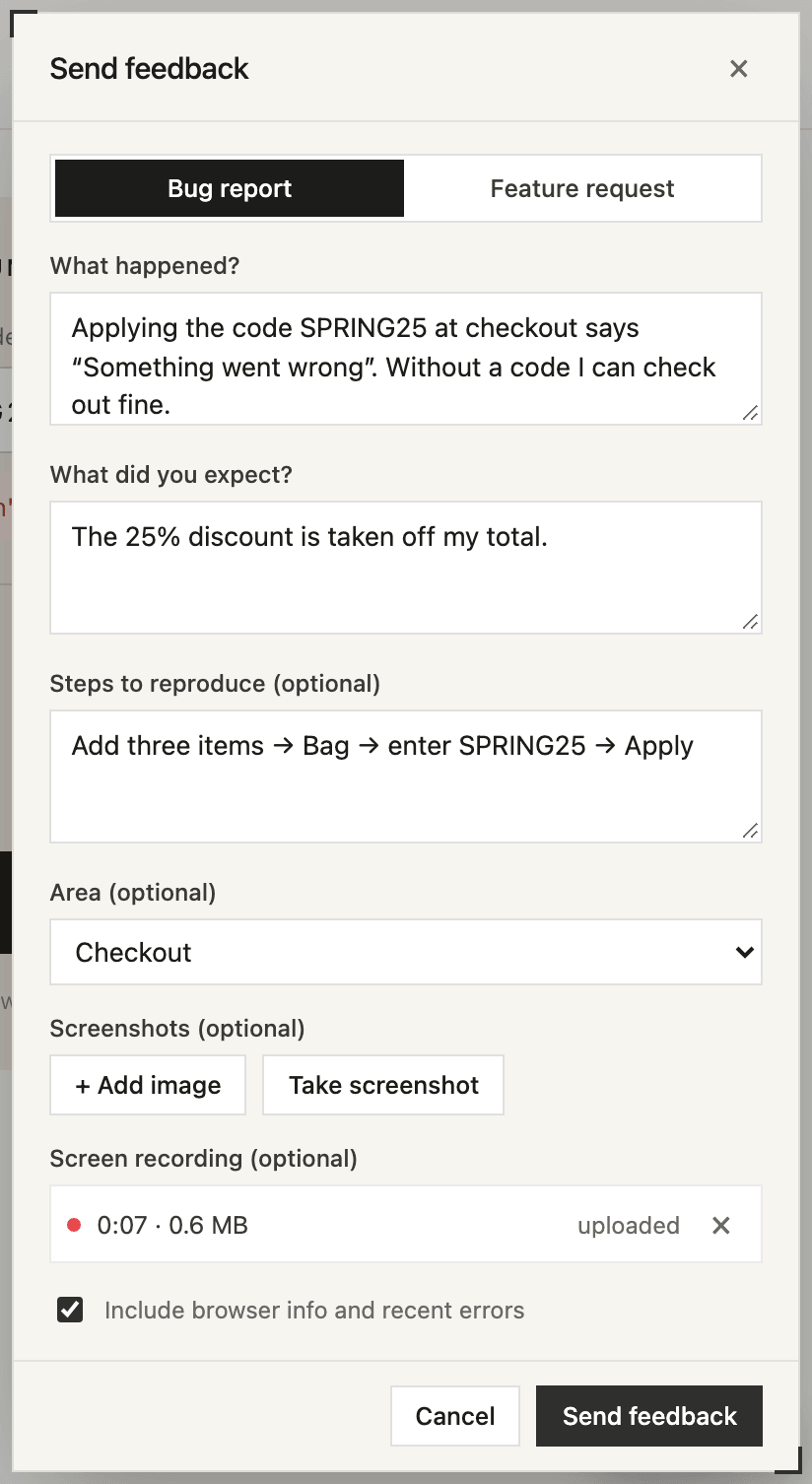
02
Users report what's wrong
A short form with an optional screen recording. Just like the one you tried above.
New bug report · Checkout
Applying the SPRING25 coupon says “Something went wrong”.
POST /api/coupon → 422
Open report →
03
You get a report you can act on
In your inbox, and in Slack, Discord or Teams if you want. Fix it yourself or hand it to your AI.
Take a look around


Works with Claude Code, Cursor and Codex
Just tell it which bug to fix
Connect your AI coding tool once. Then ask about any report in plain words. It reads what the user wrote and what the recording caught, tells you what went wrong, and asks before it changes anything.
- “What bugs came in this week?”lists the new reports
- “Look at the coupon bug”reads the report and the recording
- “Fix it and close the report”makes the change, marks it resolved
Claude Code
Someone said discount codes don't work at checkout. Can you check the feedback inbox?
Yes please
Nothing is recorded until they press Record
And it stops the moment they press Stop. Same rules on every plan.
Recorded
- ✓Only the tab or window the user picks
- ✓Clicks, scrolling and page changes
- ✓JavaScript errors
- ✓Failed requests: method, status and path
Never recorded
- ✕Anything people type
- ✕Page content, query strings, request bodies
- ✕Anything before Record or after Stop
- ✕Anything at all if the user doesn't press Record
Pricing
Try it for free on one project. Upgrade when you need more reports, AI triage or your team in. Pay yearly and save 20%.
Free
$0/mo
Free forever
For side projects and trying things out.
- 5 reports a month
- 5 screen recordings, up to 1 min each
- 1 project, 1 person
- 30 days of history
- 512 MB for recordings and screenshots
- Errors, stack traces and console attached
- MCP for Claude Code, Cursor and Codex
- Slack, Discord and Teams
Pro
Most popular$29/mo + VAT
Billed monthly
For product teams shipping every week.
- 300 reports a month
- 100 screen recordings, up to 5 min each
- 3 projects, 10 people
- 6 months of history
- 5 GB for recordings and screenshots
- AI triage for 55 reports a month
- Errors, stack traces and console attached
- MCP for Claude Code, Cursor and Codex
- Slack, Discord and Teams
- No “Powered by” badge
Max
$99/mo + VAT
Billed monthly
For agencies and teams running several products.
- 3,000 reports a month
- 1,000 screen recordings, up to 5 min each
- 25 projects, 50 people
- 1 year of history
- 35 GB for recordings and screenshots
- AI triage for 177 reports a month
- Errors, stack traces and console attached
- MCP for Claude Code, Cursor and Codex
- Slack, Discord and Teams
- No “Powered by” badge
Questions
Does it work with my stack?
Yes, if it runs in a browser. It's one script tag, so it works with plain HTML, React, Vue, Next.js, WordPress, Webflow or anything else. If you want to attach the logged-in user or open the form from your own button, there's a small JavaScript API.
Will it slow down my site or clash with my CSS?
No. The script is about 35 KB and loads async. The widget lives in a Shadow DOM, so your styles don't leak into it and its styles don't leak into your page.
Which browsers can record the screen?
Desktop Chrome, Edge and Firefox. Safari and phones can't record the screen yet, so there users take a screenshot (or add one from their phone) and mark the problem on it. The errors from the page are attached either way.
Where do new reports show up?
In your inbox, and optionally in Slack, Discord or Microsoft Teams. Slack and Discord connect in one click. Teams works through a channel webhook.
Do I need an AI agent to use this?
No. Most teams just use the inbox. The MCP server is there if you already work with Claude Code, Cursor or Codex and want them to read reports directly.
What does AI triage do?
On Pro and Max, new reports get a short summary, a suggested priority and severity, the likely cause if the errors point to one, and a flag if it looks like a duplicate of an open report. Pro covers 55 reports a month, Max 177. It's a suggestion: you accept it with one click or ignore it.
Is console logging a privacy risk?
Only console errors and warnings are collected, they stay in the user's browser until they send a report, and they're attached only if the user keeps “Include browser info and recent errors” checked. You can turn console capture off per project.
Where is the data stored?
Reports are in a managed Postgres database. Screenshots and recordings are in private storage, and only signed-in members of your team (or your agent, with your key) can open them.
Can I cancel any time?
Yes. The free plan has no time limit, but it has small monthly limits. Paid plans start at $29/month + VAT, with 20% off if you pay yearly. You can upgrade, downgrade or cancel from the billing page. EU businesses get a proper invoice after every payment.